NoticeList
public BackendReturnObject NoticeList();
public BackendReturnObject NoticeList(int limit);
public BackendReturnObject NoticeList(int limit, string offset);
파라미터
| value | Type | description | default |
|---|---|---|---|
| limit | int | 불러올 공지사항의 수 | 10 |
| offset | string | 불러올 공지사항의 시작점 | |
| BackendReturnObject.LastEvaluatedKeyString()를 통해 얻을 수 있습니다. | - |
설명
뒤끝 콘솔에 등록한 공지사항을 받아오는 기능을 제공합니다.
유저의 국가 코드가 존재하고, 콘솔에 해당 국가 공지가 등록되어 있는 경우 → 해당 국가의 공지 제목과 내용을 리턴합니다.
유저의 국가 코드가 존재하지 않거나, 콘솔에 해당 국가 공지가 등록되어 있지 않은 경우 → 기본 설정의 제목과 내용을 리턴합니다.
등록한 이미지는 http://upload-console.thebackend.io에 리턴되는 imageKey path를 추가하여 받을 수 있습니다.
공개 여부를 비공개로 설정할 경우, 함수 호출 시 리턴되는 공지 리스트에서 제외됩니다.
isPublic의 키값을 이용해 클라이언트에서 해당 공지를 노출하는 설정은 불가능합니다.
Example
동기
BackendReturnObject bro = Backend.Notice.NoticeList(2);

if(bro.IsSuccess()) {
    string offset = bro.LastEvaluatedKeyString();
    if(!string.IsNullOrEmpty(offset)) {
        // 2. 불러온 공지사항 2개 이후의 3개 불러오기
        Backend.Notice.NoticeList(3, offset);
    }
}
비동기
Backend.Notice.NoticeList(2,callback=> {
  if(callback.IsSuccess()) {
    string offset = callback.LastEvaluatedKeyString();
    if(!string.IsNullOrEmpty(offset)) {
        // 2. 불러온 공지사항 2개 이후의 3개 불러오기
        Backend.Notice.NoticeList(3, offset, callback2 => {
            // 이후 내용
            });
        }
    }
});
SendQueue
SendQueue.Enqueue(Backend.Notice.NoticeList, 2, callback => {
  if(callback.IsSuccess()) {
    string offset = callback.LastEvaluatedKeyString();
    if(!string.IsNullOrEmpty(offset)) {
        // 2. 불러온 공지사항 2개 이후의 3개 불러오기
        SendQueue.Enqueue(Backend.Notice.NoticeList, 3, offset, callback2=> {
            // 이후 내용
            });
        }
    }
});
ReturnCase
Success cases
불러오기에 성공한 경우
statusCode : 200
message : Success
returnValue : GetReturnValuetoJSON 참조
공지사항이 0개일 경우
statusCode : 200
message : Success
returnValue : { "rows":[] }
GetReturnValuetoJSON
성공 시, 등록된 공지사항들의 정보를 나타냅니다.{
rows:
[
{
content: // 공지 내용
{ S : "2019년 1월 31일 게임 업데이트 예정입니다. 업데이트 내용은 다음과 같습니다. " },
postingDate: // 공지 게시 일자
{ S : "2018-12-19T09:30:00.000Z" },
imageKey: // 첨부한 이미지 url
{ S : "/upload/2147483648/notice/2018-12-27T02:55:36.845Z511886972.jpg" },
inDate: // 공지 indate
{ S : "2018-12-19T09:26:53.382Z" },
uuid: // 공지 uuid
{ S : "38b07660-0370-11e9-8d1d-7571a0570adf" },
linkUrl: // 외부 링크 버튼 url
{ S : "http://thebackend.io" },
isPublic: // 공개/비공개 여부
{ S : "y" },
linkButtonName: // 외부 링크 버튼 이름
{ S : "buttonN" },
author: // 작성자
{ S : "jake" },
title: // 공지 제목
{ S : "게임 업데이트 공지" }
},
{
content: [Object],
postingDate: [Object],
imageKey: [Object],
inDate: [Object],
uuid: [Object],
linkUrl: [Object],
isPublic: [Object],
linkButtonName: [Object],
author: [Object],
title: [Object]
}
],
// 불러온 데이터 이후의 데이터가 존재하는 경우 리턴됨
// 불러온 데이터 이후의 데이터가 존재하지 않는 경우 리턴되지 않음
LastEvaluatedKey:{
gamer_id: { S: "notice" },
inDate:{ S: "2019-08-19T06:45:07.816Z" },
partition:{ S: "notice" }
}
}
Sample Code
public class Notice
{
    public string title;
    public string contents;
    public DateTime postingDate;
    public string imageKey;
    public string inDate;
    public string uuid;
    public string linkUrl;
    public bool isPublic;
    public string linkButtonName;
    public string author;

    public override string ToString()
    {
        return $"title : {title}\n" +
        $"contents : {contents}\n" +
        $"postingDate : {postingDate}\n" +
        $"imageKey : {imageKey}\n" +
        $"inDate : {inDate}\n" +
        $"uuid : {uuid}\n" +
        $"linkUrl : {linkUrl}\n" +
        $"isPublic : {isPublic}\n" +
        $"linkButtonName : {linkButtonName}\n" +
        $"author : {author}\n";
    }
}
public void GetNoticeList()
{
    List<Notice> noticeList = new List<Notice>();

    BackendReturnObject bro = Backend.Notice.NoticeList(10);
    if(bro.IsSuccess())
    {
        Debug.Log("리턴값 : " + bro);

        LitJson.JsonData jsonList = bro.FlattenRows();
        for(int i = 0; i < jsonList.Count; i++)
        {
            Notice notice = new Notice();

            notice.title = jsonList[i]["title"].ToString();
            notice.contents = jsonList[i]["content"].ToString();
            notice.postingDate = DateTime.Parse(jsonList[i]["postingDate"].ToString());
            notice.inDate = jsonList[i]["inDate"].ToString();
            notice.uuid = jsonList[i]["uuid"].ToString();
            notice.isPublic = jsonList[i]["isPublic"].ToString() == "y" ? true : false;
            notice.author = jsonList[i]["author"].ToString();

            if(jsonList[i].ContainsKey("imageKey"))
            {
                notice.imageKey = "http://upload-console.thebackend.io" + jsonList[i]["imageKey"].ToString();
            }
            if(jsonList[i].ContainsKey("linkUrl"))
            {
                notice.linkUrl = jsonList[i]["linkUrl"].ToString();
            }
            if(jsonList[i].ContainsKey("linkButtonName"))
            {
                notice.linkButtonName = jsonList[i]["linkButtonName"].ToString();
            }

            noticeList.Add(notice);
            Debug.Log(notice.ToString());
        }
    }
}
공지사항에 등록한 이미지를 조회하는 방법
공지사항 등록 시 이미지를 등록했다면 위 GetReturnValuetoJSON() 값의 imageKey 값에서 이미지가 저장된 주소를 확인할 수 있습니다.
이 이미지 키값은 http://upload-console.thebackend.io/ 에 리턴된 이미지 키값을 더해 아래와 같은 주소로 요청하면 이미지를 조회할 수 있습니다.
http://upload-console.thebackend.io/upload/2147483648/event/2018-12-27T02:46:57.391Z312652213.jpg
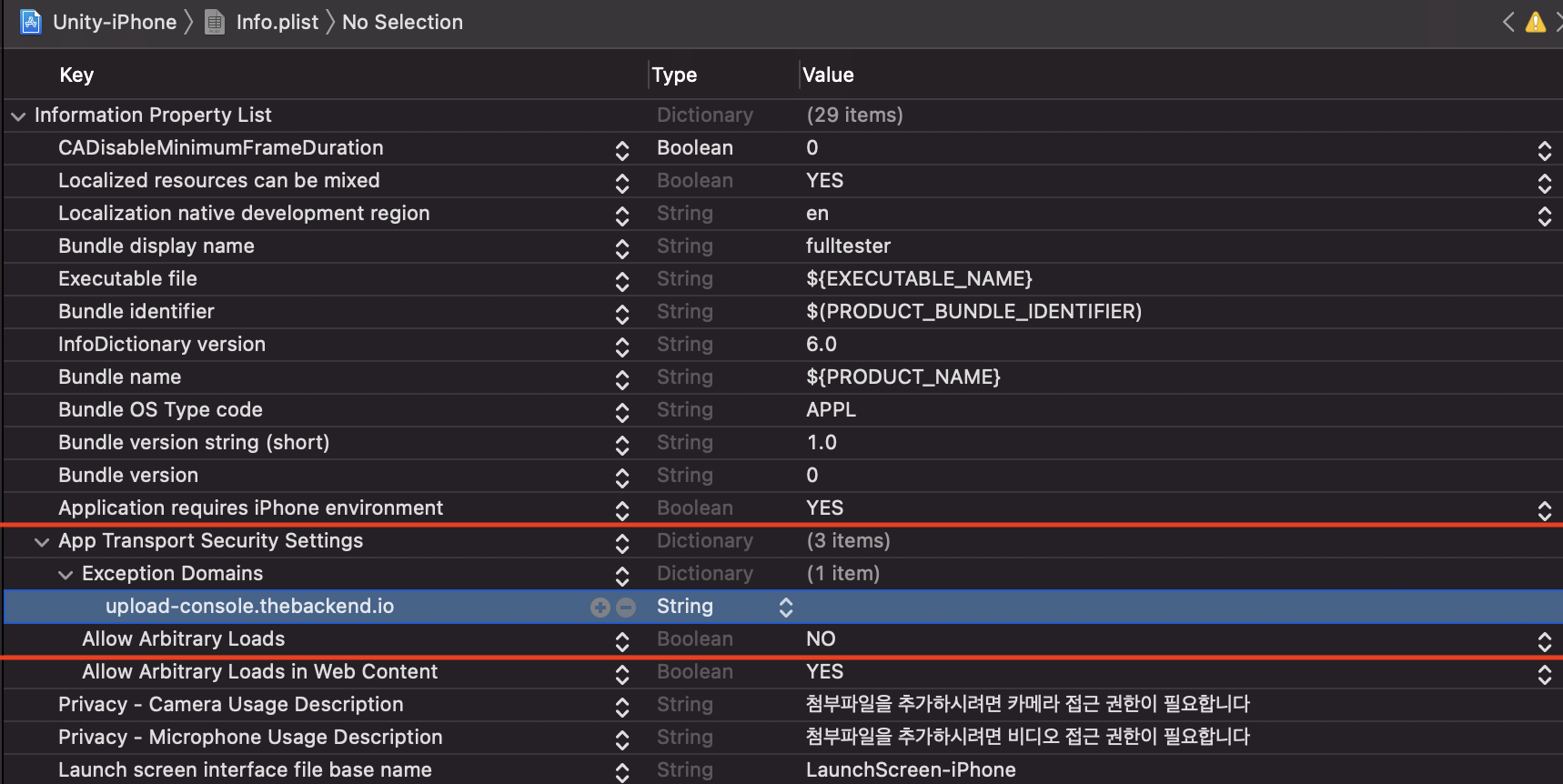
- iOS는 보안 정책에 따라 기본적으로 http의 접근을 제한하고 있습니다.
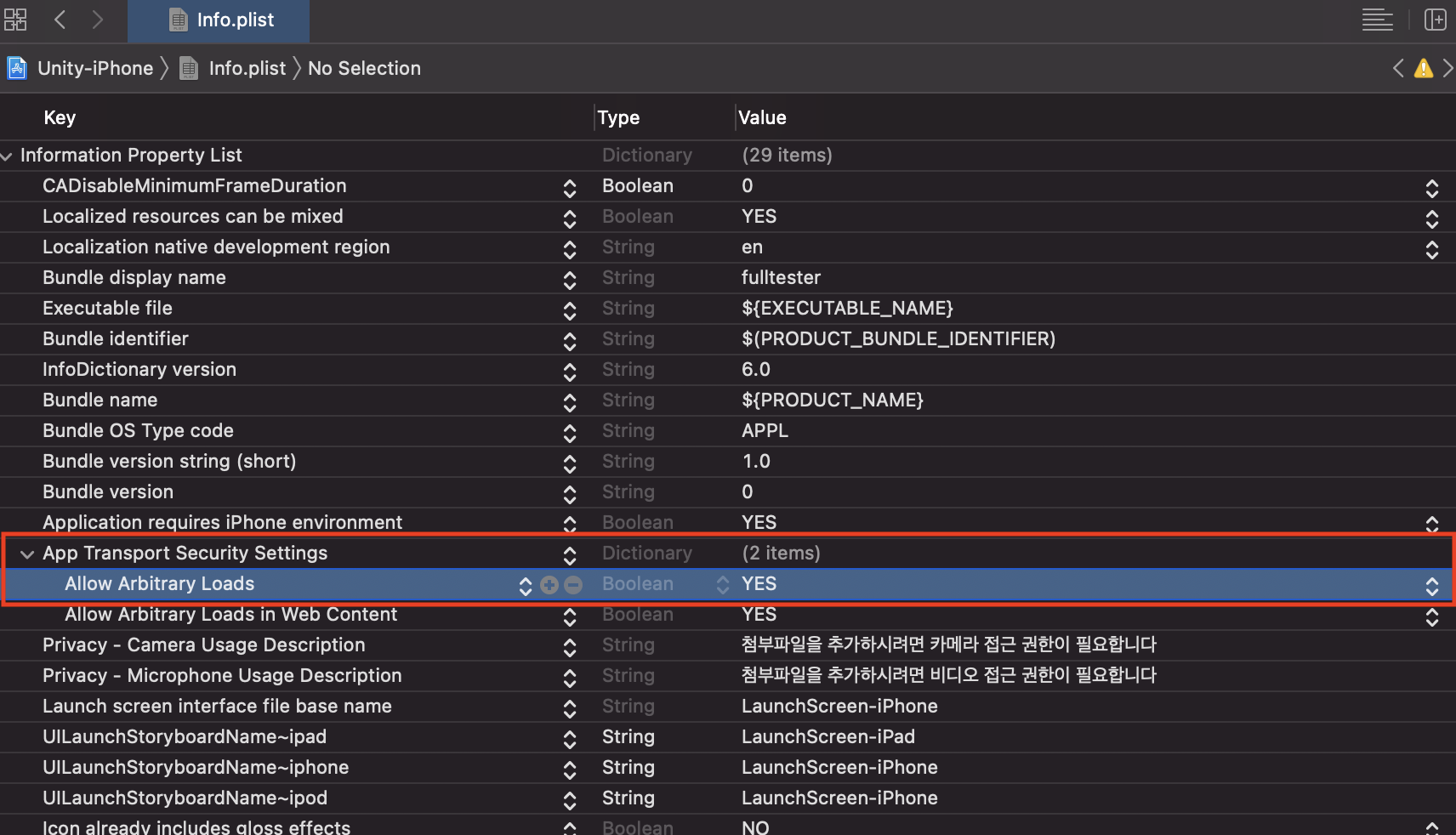
iOS 기기에서 공지/이벤트에 등록한 이미지를 가져오고 싶을 경우에는 아래와 같이 모든 http를 허용하거나 특정 도메인에 대한 예외 처리를 해주세요.
프로젝트 빌드 후 Info.lplist 열기 > Key중 App Transport Security Settings Key 값을 찾거나 생성.
CASE-1. 모든 Http의 접근을 허용할 경우.
App Transport Security Settings의 Allow Arbitrary Loads를 YES로 변경합니다.
CASE-2. 특정 도메인의 접근만 허용할 경우
- App Transport Security Settings의 Allow Arbitrary Loads를 NO로 변경합니다.
- App Transport Security Settings의 옵션 중 Exception Domains를 생성하고 하위에 upload-console.thebackend를 추가합니다.