NoticeOneV2
public BackendReturnObject NoticeOneV2(string inDate);
파라미터
| Value | Type | Description |
|---|---|---|
| inDate | string | 불러올 공지사항의 inDate (NoticeListV2의 GetReturnValuetoJSON()["rows"][i]["inDate"]) |
설명
뒤끝 콘솔에 등록한 공지사항 항목 중 특정 공지사항의 정보를 반환합니다.
리스트의 특정 공지사항을 가져오기 위해서는 inDate값이 필요합니다.
Example
동기
BackendReturnObject bro = Backend.Notice.NoticeListV2(2);

string inDate = bro.GetReturnValuetoJSON()["rows"][0]["inDate"].ToString();

BackendReturnObject bro2 = Backend.Notice.NoticeOneV2(inDate);

string content = bro2.GetReturnValuetoJSON()["row"]["content"]["content"].ToString();
비동기
Backend.Notice.NoticeListV2(2, callback => {
    string inDate = callback.GetReturnValuetoJSON()["rows"][0]["inDate"].ToString();

    Backend.Notice.NoticeOneV2(inDate, callback2 => {
        string content = callback2.GetReturnValuetoJSON()["row"]["content"]["content"].ToString();
    });
});
SendQueue
SendQueue.Enqueue(Backend.Notice.NoticeListV2, 2, callback => {
    string inDate = callback.GetReturnValuetoJSON()["rows"][0]["inDate"].ToString();

    SendQueue.Enqueue(Backend.Notice.NoticeOneV2, inDate, callback2 => {
        string content = callback2.GetReturnValuetoJSON()["row"]["content"]["content"].ToString();
    });
});
ReturnCase
Success cases
불러오기에 성공한 경우
statusCode : 200
message : Success
returnValue: GetReturnValuetoJSON 참조
Error cases
해당 공지사항이 없는 경우
statusCode : 404
errorCode : NotFoundException
returnValue: notice not found, notice을(를) 찾을 수 없습니다
GetReturnValuetoJSON
성공 시, 해당 공지사항의 정보를 나타냅니다.
{
    "row": {
        "uuid": "f3df1f9d-52eb-4685-8d35-f75528789292", // 공지 uuid
        "inDate": "2026-02-03T04:21:16.627Z",           // 공지 inDate
        "postingDate": "2025-07-20",                    // 공지 게시 일자
        "isPublic": "y",                                // 공개/비공개 여부 (y: 공개)
        "noticeTitle": "공지 제목",                       // 공지 제목
        "author": "운영자",                               // 작성자 정보 (관리자 닉네임)
        "content": {                                    // 공지 컨텐츠 (다국어 지원)
            "title": "한국어",                            // 컨텐츠 제목
            "content": "한국어 공지 내용",                  // 공지 내용
            "imageKey": "",                             // 첨부한 이미지 키
            "linkUrl": "",                              // 외부 링크 버튼 url
            "language": "kr",                           // 언어 코드
            "fallback": true                            // 기본 언어 폴백 여부
        }
    }
}
Sample Code
// 공지 컨텐츠
public class NoticeContent
{
    public string title;
    public string content;
    public string imageKey;
    public string linkUrl;
    public string language;
    public bool fallback;

    public override string ToString()
    {
        return $"  title : {title}\n" +
        $"  content : {content}\n" +
        $"  imageKey : {imageKey}\n" +
        $"  linkUrl : {linkUrl}\n" +
        $"  language : {language}\n" +
        $"  fallback : {fallback}\n";
    }
}

public class NoticeItem
{
    public string uuid;
    public string inDate;
    public DateTime postingDate;
    public bool isPublic;
    public string noticeTitle;
    public string author;
    public NoticeContent content;

    public override string ToString()
    {
        return $"uuid : {uuid}\n" +
        $"inDate : {inDate}\n" +
        $"postingDate : {postingDate}\n" +
        $"isPublic : {isPublic}\n" +
        $"noticeTitle : {noticeTitle}\n" +
        $"author : {author}\n" +
        $"content :\n{content}";
    }
}
public void NoticeOne()
{
    List<NoticeItem> noticeList = new List<NoticeItem>();
    List<string> noticeIndateList = new List<string>();

    BackendReturnObject bro = Backend.Notice.NoticeListV2(10);

    if(!bro.IsSuccess())
        return;

    LitJson.JsonData rows = bro.GetReturnValuetoJSON()["rows"];
    for(int i = 0; i < rows.Count; i++)
    {
        noticeIndateList.Add(rows[i]["inDate"].ToString());
    }

    for(int i = 0; i < noticeIndateList.Count; i++)
    {
        var noticeOne = Backend.Notice.NoticeOneV2(noticeIndateList[i]);

        if(noticeOne.IsSuccess())
        {
            var json = noticeOne.GetReturnValuetoJSON()["row"];

            NoticeItem notice = new NoticeItem();

            notice.uuid = json["uuid"].ToString();
            notice.inDate = json["inDate"].ToString();
            notice.postingDate = DateTime.Parse(json["postingDate"].ToString());
            notice.isPublic = json["isPublic"].ToString() == "y";
            notice.noticeTitle = json["noticeTitle"].ToString();
            notice.author = json["author"].ToString();

            // content 객체 파싱
            LitJson.JsonData contentJson = json["content"];
            notice.content = new NoticeContent
            {
                title = contentJson["title"].ToString(),
                content = contentJson["content"].ToString(),
                imageKey = contentJson["imageKey"].ToString(),
                linkUrl = contentJson["linkUrl"].ToString(),
                language = contentJson["language"].ToString(),
                fallback = (bool)contentJson["fallback"]
            };

            noticeList.Add(notice);
            Debug.Log(notice.ToString());
        }
        else
        {
            Debug.Log($"해당 공지사항을 불러올 수 없습니다 : {noticeIndateList[i].ToString()}");
        }
    }
}
공지사항에 등록한 이미지를 조회하는 방법
공지사항 등록 시 이미지를 등록했다면 위 GetReturnValuetoJSON() 값에서 content 객체 내의 imageKey 값을 통해 이미지가 저장된 주소를 확인할 수 있습니다.
이 이미지 키값은 http://upload-console.thebackend.io 에 리턴된 이미지 키값을 더해 아래와 같은 주소로 요청하면 이미지를 조회할 수 있습니다.
http://upload-console.thebackend.io/{imageKey 값}
iOS 주의
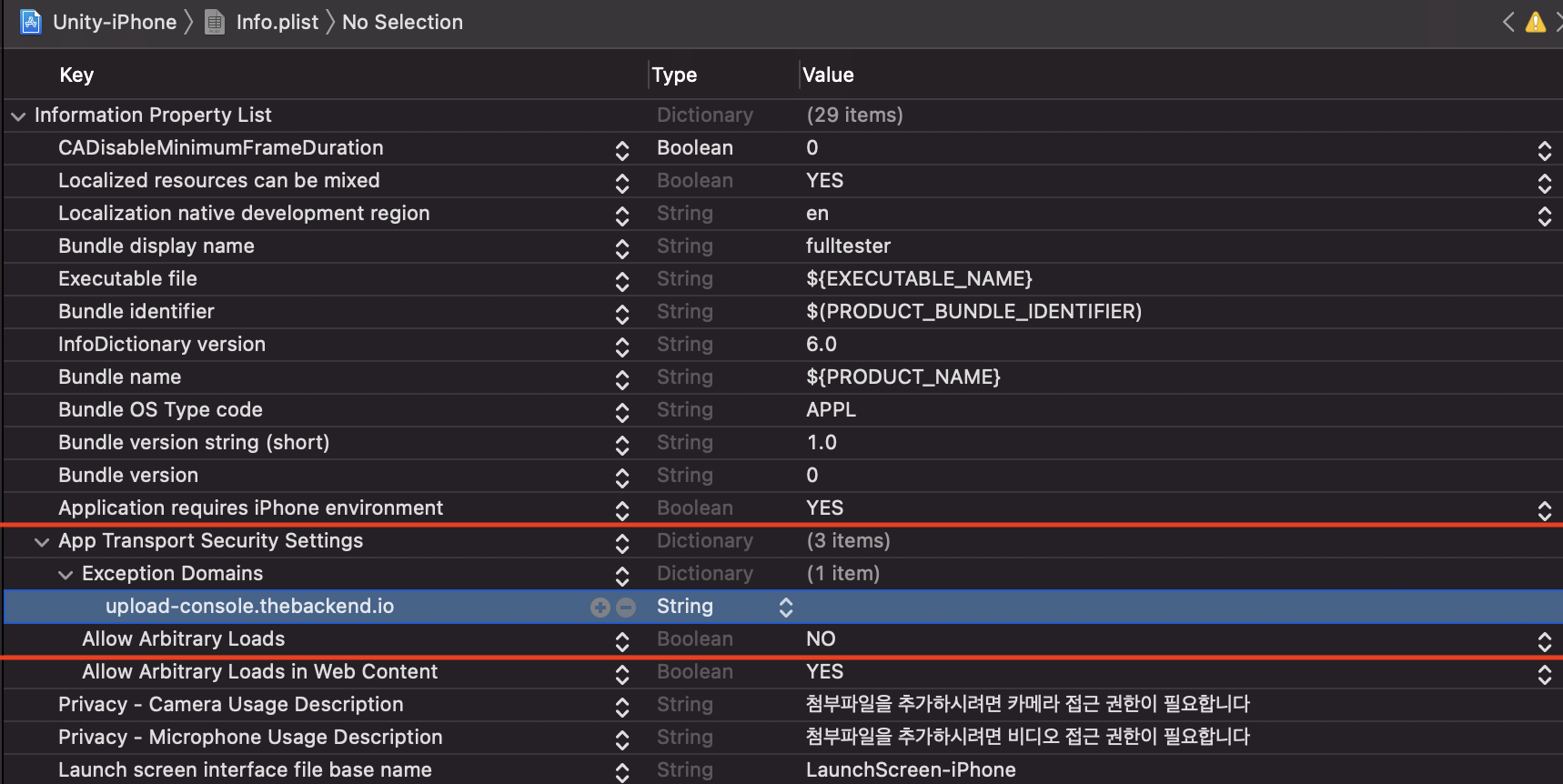
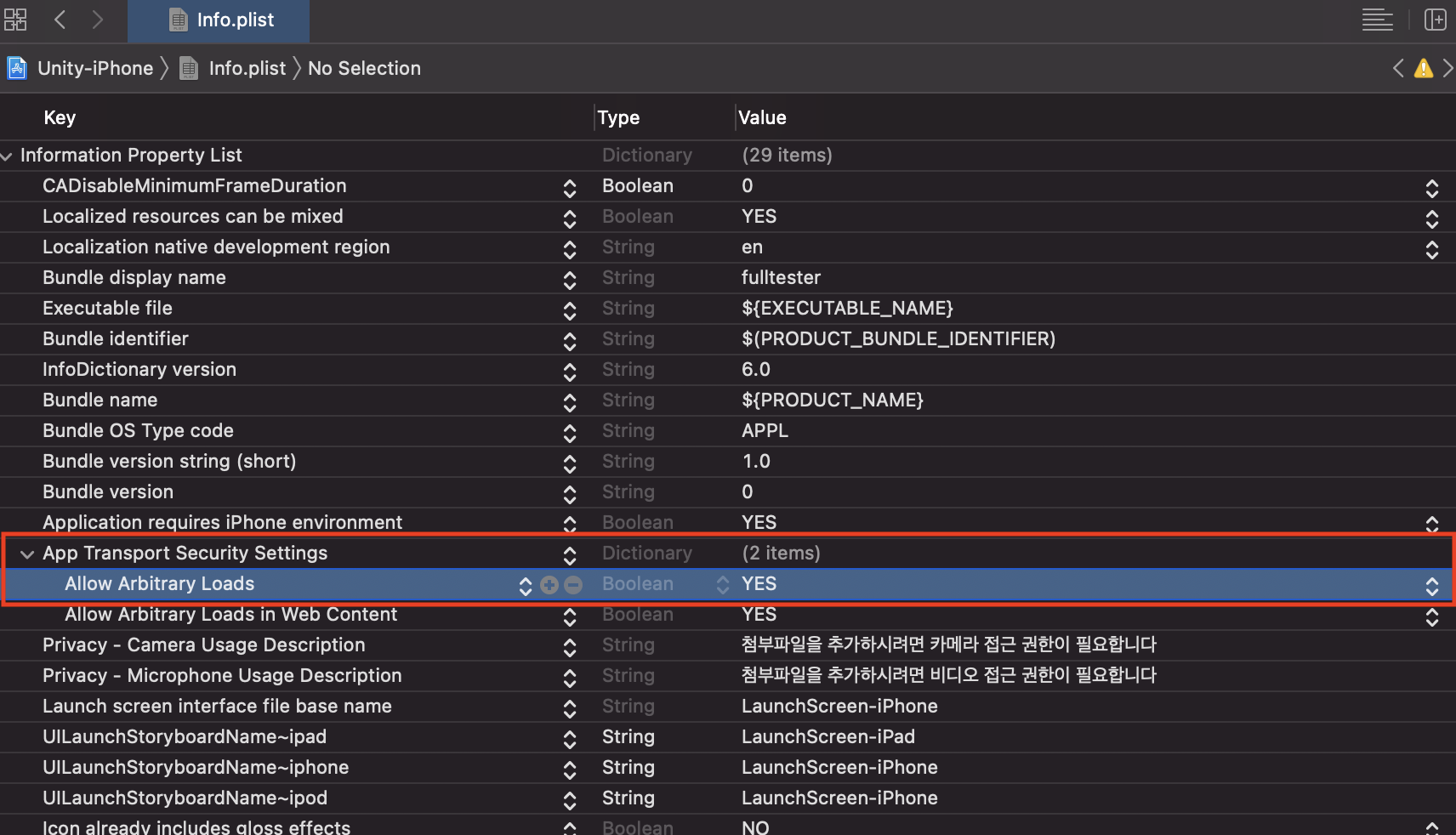
- iOS는 보안 정책에 따라 기본적으로 http의 접근을 제한하고 있습니다. iOS 기기에서 공지/이벤트에 등록한 이미지를 가져오고 싶을 경우에는 아래와 같이 모든 http를 허용하거나 특정 도메인에 대한 예외 처리를 해주세요.
프로젝트 빌드 후 Info.plist의 App Transport Security Settings 설정
CASE-1. 모든 Http의 접근을 허용할 경우.
App Transport Security Settings의 Allow Arbitrary Loads를 YES로 변경합니다.
CASE-2. 특정 도메인의 접근만 허용할 경우
- App Transport Security Settings의 Allow Arbitrary Loads를 NO로 변경합니다.
- App Transport Security Settings의 옵션 중 Exception Domains를 생성하고 하위에 upload-console.thebackend를 추가합니다.