Backend.CDN.Content.Local.Update
public BackendContentReturnObject Backend.CDN.Content.Local.Update();
public void Backend.CDN.Content.Local.Update(List< ContentTableItem > contentTableList, ContentProgressDelegate contentProgressDelegate, Backend.BackendCallback< BackendContentReturnObject > backendCallback);
Description
Compare the chart list and the local list assigned to the parameter values to only load and save the updated chart into local storage.
- This method cannot be called using SendQueue.
Only the following charts will be newly loaded.
- If the chart does not exist locally
- If the selected chart file has changed
- If the chart has been modified
If a chart whose chart file has not been applied in the BACKND Console remains in the local storage, that chart will be deleted immediately upon Update.
Example
Synchronous
public void LocalUpdate()
{
    BackEnd.Content.BackendContentTableReturnObject callback = Backend.CDN.Content.Table.Get();

    if(callback.IsSuccess() == false) {
        Debug.LogError(callback);
        return;
    }

    BackEnd.Content.BackendContentReturnObject localCallback = null;
    localCallback = Backend.CDN.Content.Local.Update(callback.GetContentTableItemList());

    if(localCallback.IsSuccess() == false) {
        Debug.LogError(localCallback);
        return;
    }

    Dictionary<string, BackEnd.Content.ContentItem> dic = localCallback.GetContentDictionarySortByChartId();

    foreach (string keyName in dic.Keys)
    {
        Debug.Log(dic[keyName].ToString());
    }

    // If the chart file name is 'Content'
    // For contentJson, refer to the Success Cases below
   if(dic.ContainsKey("Input ChartID"))  //Enter the Chart ID *Caution :Not Chart File ID*
    {
        LitJson.JsonData json = LitJson.JsonMapper.ToObject(dic["Input ChartID"].contentJson);

        foreach(LitJson.JsonData item in json) {
            Debug.Log(item["itemID"]);
            Debug.Log(item["itemName"]);
            Debug.Log(item["hpPower"]);
            Debug.Log(item["num"]);
        }
    }
}
Asynchronous
private void GetProgress(int totalCount, int remainCount, string fileName)
{
    Debug.Log("totalCount : " + totalCount + " remainCount : " + remainCount + " fileName : " + fileName);
}

public void LocalUpdateAsync()
{
    StartCoroutine(LocalUpdateAsyncIEnumerator());
}

IEnumerator LocalUpdateAsyncIEnumerator()
{
    BackEnd.Content.BackendContentTableReturnObject tableCallback = null;

    Backend.CDN.Content.Table.Get(bro =>
    {
        tableCallback = bro;
    });

    yield return new WaitUntil(() => tableCallback != null);

    if(tableCallback.IsSuccess() == false) {
        Debug.LogError(tableCallback);
        yield break;
    }


    BackEnd.Content.BackendContentReturnObject callback = null;

    Backend.CDN.Content.Local.Update(tableCallback.GetContentTableItemList(), GetProgress, bro => {
        callback = bro;
    });

    yield return new WaitUntil(() => callback != null);

    if (callback.IsSuccess() == false)
    {
        Debug.LogError("GetContents : Fail : " + callback);
        yield break;
    }

    Dictionary<string, BackEnd.Content.ContentItem> dic = callback.GetContentDictionarySortByChartId();


    foreach (string keyName in dic.Keys)
    {
        Debug.Log(dic[keyName].ToString());
    }

    // If the probability file name is 'Content'
    // For contentJson, refer to the Success Cases below
    if(dic.ContainsKey("Input ChartID"))  //Enter the Chart ID *Caution :Not Chart File ID*
    {
        LitJson.JsonData json = LitJson.JsonMapper.ToObject(dic["Input ChartID"].contentJson);

        foreach(LitJson.JsonData item in json) {
            Debug.Log(item["itemID"]);
            Debug.Log(item["itemName"]);
            Debug.Log(item["hpPower"]);
            Debug.Log(item["num"]);
        }
    }
}
ReturnCase
Success cases
When the lookup is successful
statusCode : 204
message : Success
In the case of success, refer to the GetContentDictionaryByChartName() method.
ContentJson
The ContentItem class's LitJson.JsonData contentJson is displayed according to the following in the example chart below.
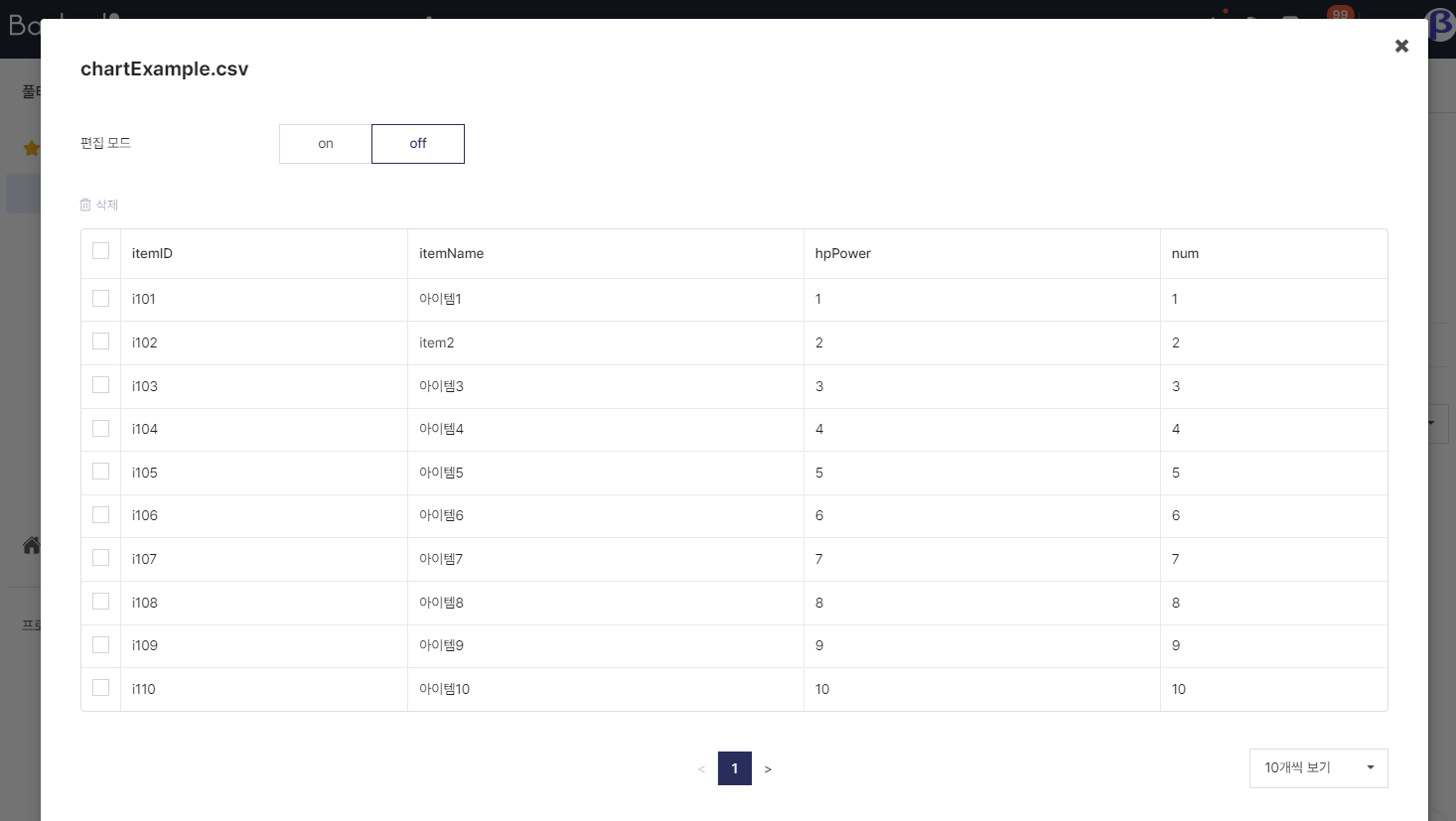
[
    {
        "itemID": "i101",
        "itemName": "Item1",
        "hpPower": "1",
        "num": "1"
    },
    {
        "itemID": "i102",
        "itemName": "Item2",
        "hpPower": "2",
        "num": "2"
    },
    ...
]